Go Back
The Haivenly Setup Guide: How to Organize Your Kitchen, Recipes & Meal Plans
Learn how Haivenly turns your fridge, pantry, and recipes into one smart system. Scan groceries, save recipes, and let meal planning do the rest.

Mary Katzman
Meal Planning
Shopping & Inventory

Welcome! We’re thrilled you want to take this step toward more manageable days and less overwhelm. We built Haivenly because our family was constantly reacting to what our daily schedule threw at us. We were too busy solving logistics in the moment rather than planning ahead to alleviate stress. The core idea behind this household management platform was to get the minutiae of everyday life out of our heads and into a central “database” that can be optimized according to weekly priorities. We hope you find that with a few daily or weekly updates, Haivenly can begin to carry much of the mental load for you. And you can enjoy living in the moment because there is an easier way to keep track of the rest.
Let’s Start With the Kitchen: Your Grocery & Pantry Inventory
The engine of Haivenly is the ability to log and manage the contents of your fridge and pantry, which means you instantly have answers to these most common internal questions:
What can I make for dinner?
Do we have [random ingredient] at home?
Do you think the [thing in the fridge] is still good to eat?
Can I make it another day without a trip to the grocery store?
You probably have A LOT of items already that need to be logged. Our advice is to start with your next trip to the store and slowly build from there. We made it easy, because manually entering dozens of things is not how you should be spending your time – unless you really want to.
Step One: Use the Receipt Scanner
The next time you have a grocery store receipt, open Haivenly on your phone and find the “snap receipt” button. With a quick picture, Haivenly will match the products and items you purchased and add them to your kitchen’s inventory. You’ll have the option to review, and once done, your grocery haul will be added to your Household. And over time, as more items are restocked and new items are purchased, your household inventory will be more thorough and up-to-date.
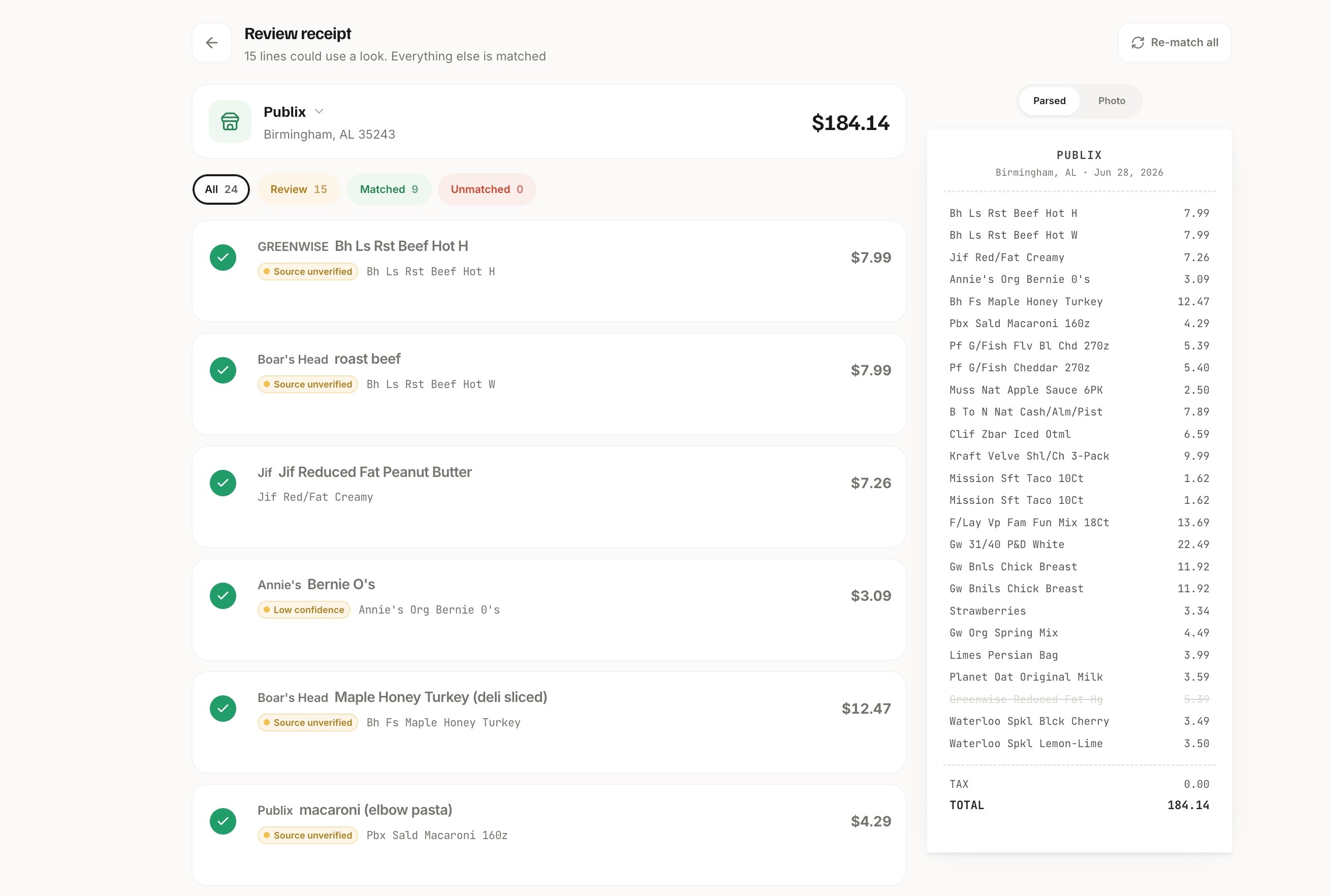
Step Two: Add Additional Items With the Barcode Scanner
Don’t want to wait for the next grocery receipt to scan? A barcode scanner is available to quickly add the one-off ingredients or backstock items that you want to make accessible to Haivenly’s kitchen features. This can be done gradually one item at a time, or in small bursts – like tackling the spice drawer in 20 minutes. Or, take advantage of the moment, clean out the fridge and pantry, and inventory what gets added back to your newly organized space.
Step Three: If Needed, Add Items Manually
Haivenly has an option to manually input an item and assign a category, location (fridge, pantry, freezer), and restock threshold. This is perfect for ingredient hacks for meal prep, like frozen cubes of basil pesto or leftover Parmesan rinds.
Save Your Favorite Recipes in One Recipe Organizer
Whether you have links bookmarked, recipe notecards, or earmarked cookbooks, Haivenly becomes a central hub for your family’s go-to favorites. Meals are planned magically when Haivenly looks up what’s already on hand.
Copy & Paste a Recipe Link
We all have food bloggers, recipe sites, and content creators we follow and love. But often that means remembering which website has what recipe or searching to find it again. When you find a recipe you want to try, remember for later, or make again, import it into your Haivenly account by copying and pasting the link.
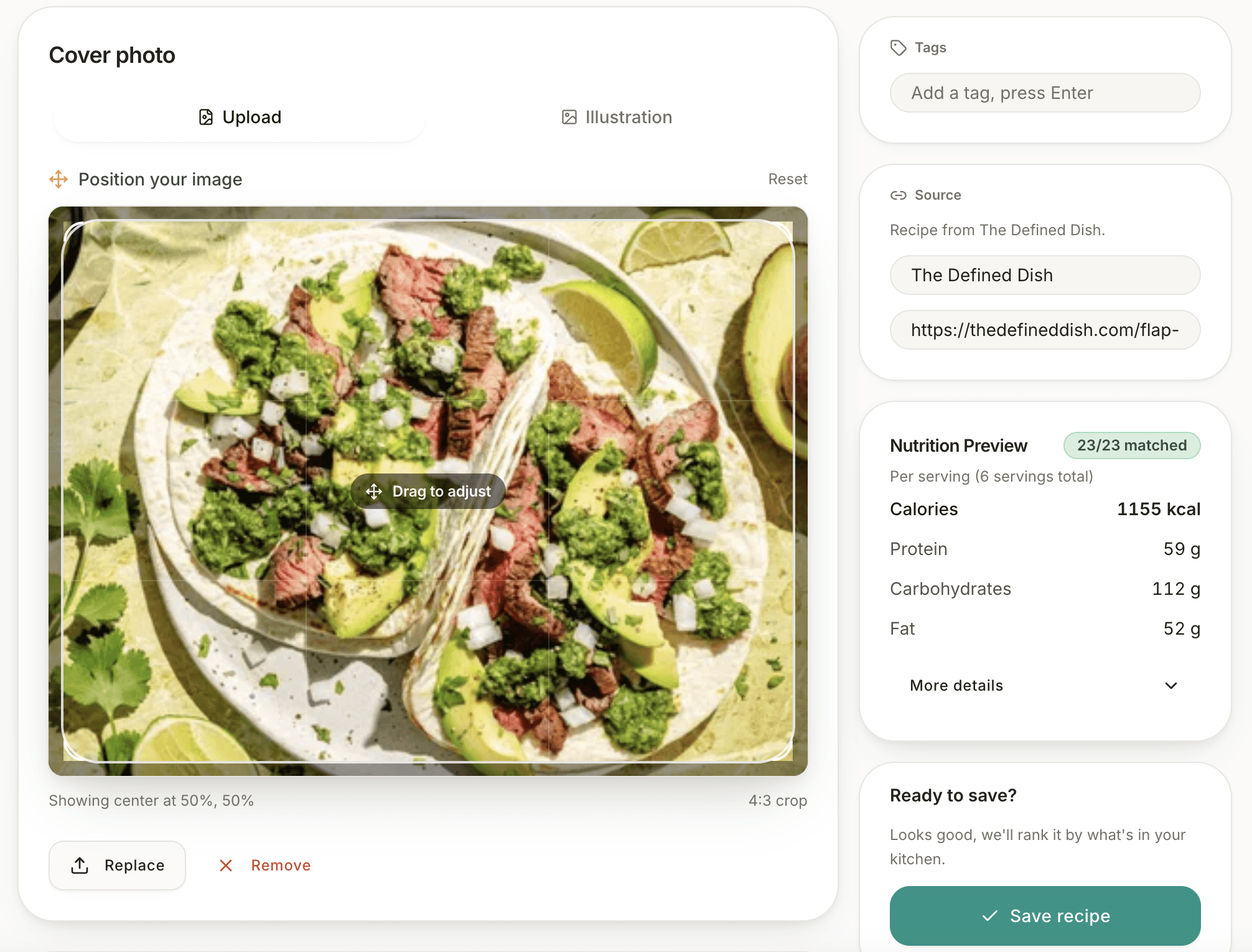
Haivenly pulls in all the details you need: the image, recipe author, ingredients, and directions. You’ll have a chance to review and make any personal adjustments before saving. Added features to rate, bookmark, or add a note for next time mean no matter how many recipes you save, you’ll always find the one you want.
Build By Hand
No link? No problem. Quickly add a recipe you have written down or know by heart. This way, Haivenly can tell you whether or not you have everything you need to make mom’s famous chicken salad without having to rifle through the fridge yourself.
Meal Plan Like Magic
Here’s where it all comes together. When Haivenly knows the contents of your kitchen AND knows what recipes you love to cook, you never have to ask “what can I make for dinner” again.
What Can I Cook?
One button click, that’s all it takes to answer what’s for dinner? Haivenly looks at your household inventory and compares it to the ingredient lists from your recipes. When there is a 100% match, that’s what you can cook for dinner. It’s that simple. It’s that magical.
Plan My Week
For planning ahead, Haivenly’s meal planning feature shows you recommended recipes based on what’s ready to cook, suggestions after a shopping trip, or ones you’ve bookmarked. An easy drag-and-drop lets you add meals to your weekly plan. For premium users, the “Plan My Week” feature does the thinking for you by automatically planning meals based on set preferences, ingredients, even events on your calendar.
Smarter Shopping With an Automated Grocery List
As you are meal planning for the week, or just looking ahead to the next day, Haivenly automates a shopping list based on what you plan to make, or what ingredients are running low.
Add to List
There are several ways Haivenly adds grocery items to your shopping list:
From Recipes: Haivenly will tell you which ingredients are missing with an option to add them to the list with a button click.
From Restock: This view will tell you which items in your household are running low and may need to be replenished.
From Kitchen: Once you’ve meal planned, click on the full list of ingredients for the week and add the items you need to shop for.
From You: Haivenly has voice recognition. Press the microphone button and tell the app what to add.
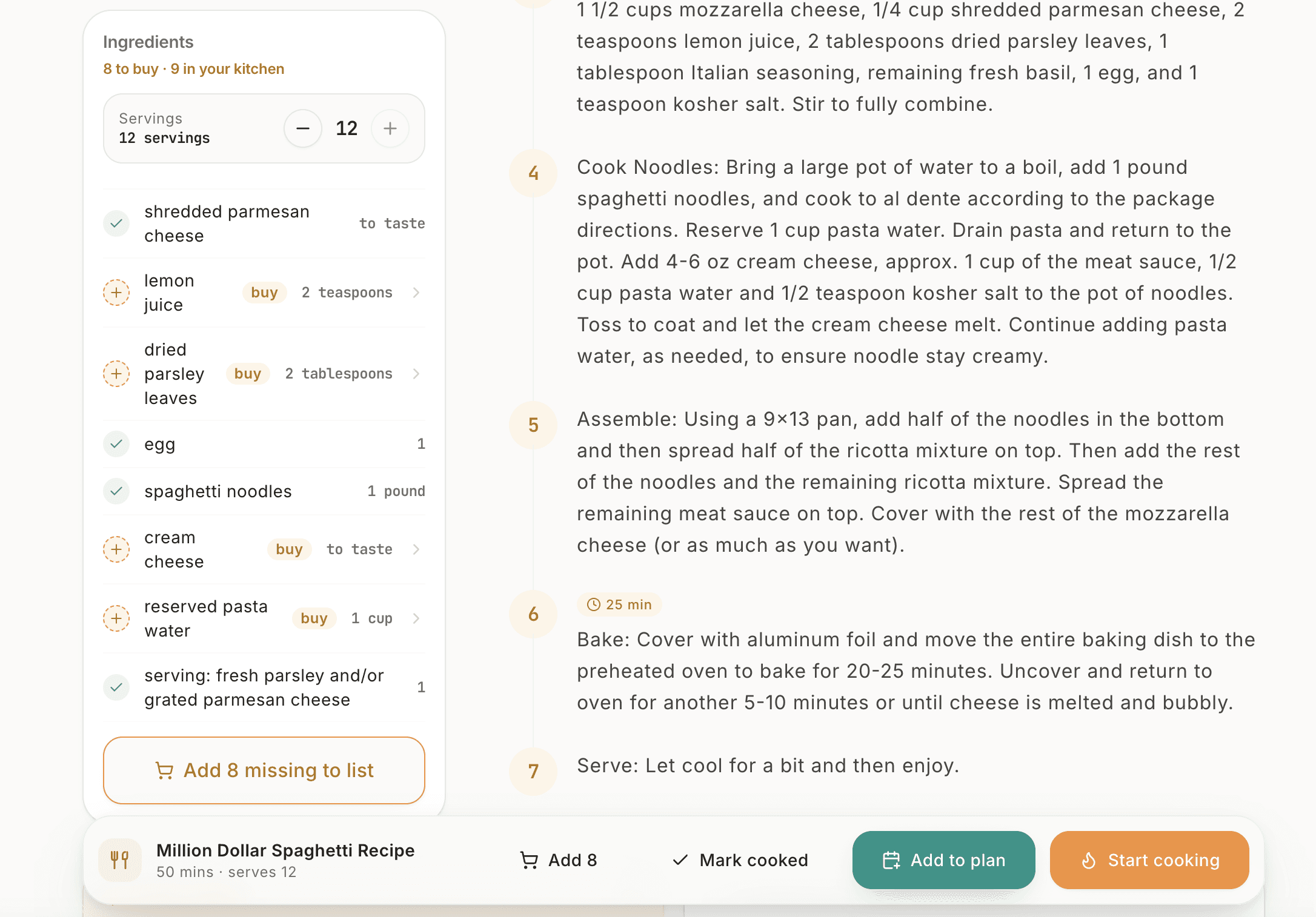
When You Don’t Have a List
You’ll find yourself in the grocery store without a list. When it happens, a quick scan of your household inventory on your phone will tell you what you need to pick up. Or, what’s running low and may need a backup. A quick search will tell you if you already have something and can put it back on the shelf.
Ready to Take the Mental Load Off Your Plate?
From the moment you snap your first receipt to the night Haivenly plans your entire week, every feature is built around one goal: giving you back the headspace that grocery runs, recipe hunting, and “what’s for dinner” used to take up. You don’t have to set it all up at once. Start with your kitchen inventory, add a few favorite recipes, and let the meal planning and shopping list features take it from there.
Start your free Haivenly trial today and start building your household’s central hub, one grocery trip at a time.
More posts you may like
Shopping & Inventory

Oct 19, 2026
·
Justin Katzman
Shopping & Inventory

Oct 15, 2026
·
Justin Katzman
Meal Planning

Oct 15, 2026
·
Justin Katzman
About Us
Shopping & Inventory

Aug 20, 2026
·
Mary Katzman